
Every call, on the record.
Each call the receptionist takes is recorded, transcribed and summarized in the dashboard a few seconds after it ends, with what happened (booked, messaged, transferred) and who called. You decide what's announced at the start of a call, so the recording matches the consent rules where you operate.
Thu 9:12 a.m. · 1 min 44 s · Tess Walker · +1 (512) 555-0178 · Booked
Summary: Dryer runs but isn't heating. Booked tomorrow 9:30 a.m. at 41 Maple Court. Caller confirmed callback number.
Thanks for calling Brightline Appliance, this is Alex. This call is recorded.
Hi, my dryer runs but it isn't heating…
Play recording · Transcript · Appointment #458 · Tag: dryer
The record of the booking call from the demo line: summary first, then the full transcript and the audio.
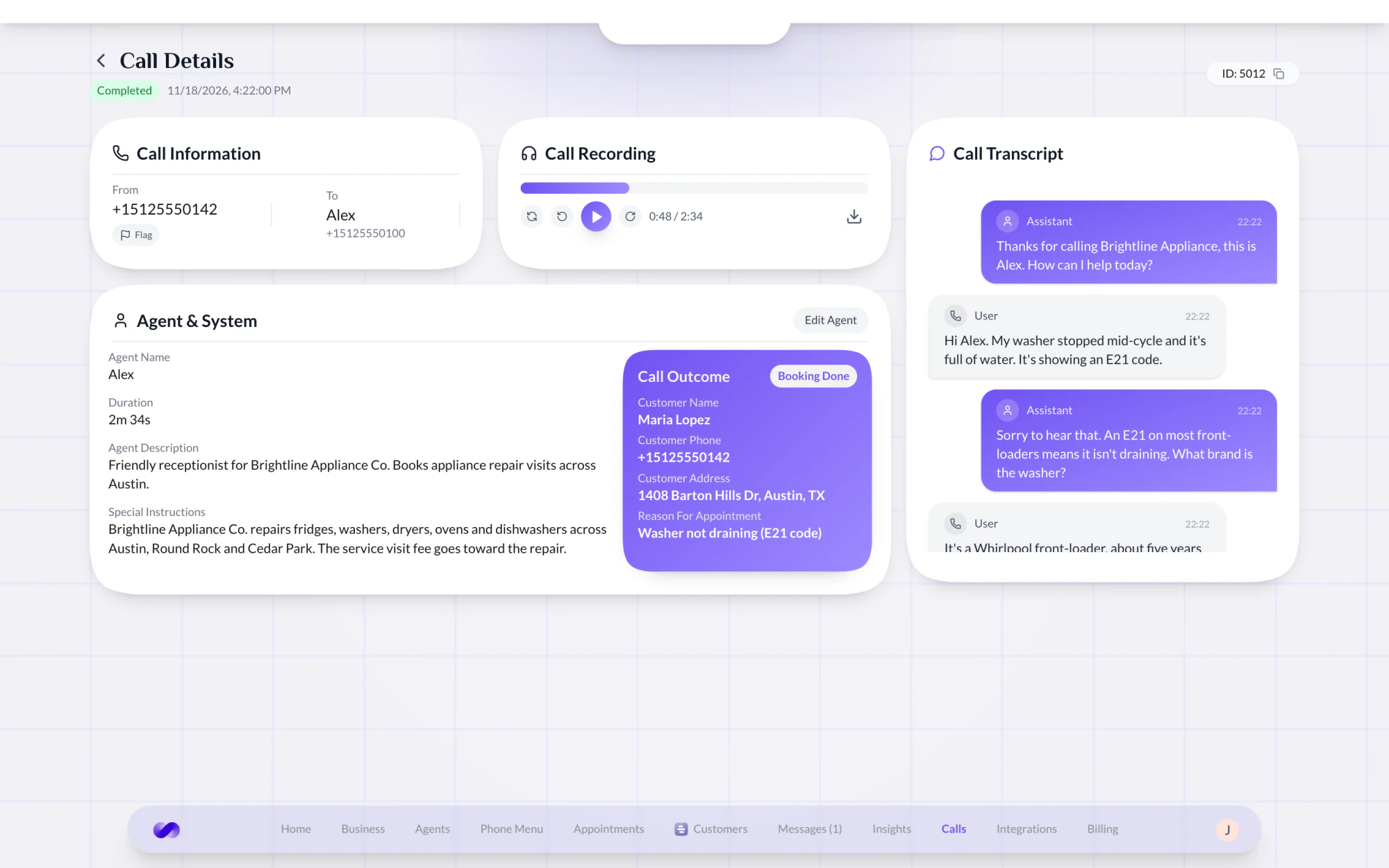
The dashboard, with our fictional demo shop's data.
What happens on the call
- Recorded and transcribed
Audio is captured for the whole call, including a transfer. The transcript is word-level and timestamped; the summary is three or four lines you can read from your phone.
- Searchable
Filter calls by day, outcome, tag or caller. Open any call and jump to the moment the address was given.
- Shared safely
Recordings are behind your login. A signed link lets you share one recording with a tech without giving them an account.
- Deleted on request
Delete any recording from the dashboard; ask us and we delete an account's recordings entirely.
Settings in the dashboard
Plain switches and plain-language instructions.
On by default: the first sentence says the call is recorded. Turn it off if your state doesn't require it and you'd rather skip it.
It can say it's an automated assistant at the start of the call. On for new receptionists; you choose.
Owners and dispatchers can play recordings; viewers see summaries only.
If a caller reads out a card number, it is redacted in the transcript and the recording's text.
Questions owners ask
Or ask Alex yourself: call +1 (534) 248-9962.
Is recording legal in my state?
Rules differ by state and country; some require that every party is told. The recording announcement is on by default so the caller is told in the first sentence. Check your own requirements; we don't give legal advice.
How long are recordings kept?
Until you delete them. Delete one from the dashboard, or ask us to delete everything for your account.
Can I download them?
Yes, from the call page.
Do transcripts include the transfer?
The receptionist's part of the call is transcribed and summarized. The conversation with your team member after a transfer is recorded but not summarized.
Is this extra?
No. Recordings, transcripts and summaries are in the plan for every call.
Want us to set it up for you?
Leave a number. Someone from our team calls you, goes through your services, hours and service area, and sets your receptionist up with you.
- A person on our team calls you back
- Your greeting, questions and urgent-call rules, set up together
- You hear it answer before it takes real calls
Related pages
Hear how your next call gets answered.
Call the demo line and talk to Alex yourself. Live on your number in about ten minutes.
Demo line +1 (534) 248-9962