
It texts too. And reads the photo.
AI Texting gives your receptionist your text line: customers text the number and get answers in your business's voice. It reads photos of the model sticker or the error code, and books the visit by text. A missed call gets a text within seconds, every booking gets a confirmation and a reminder, and you can take over any thread from the dashboard.
Hi, my dishwasher shows this and won't start. [photo of the control panel]
Thanks. That's a Whirlpool, error F8 E4, which usually means a water-inlet fault. We can look at it. What's the address?
41 Maple Court, Austin
Got it. Thursday I have nine thirty or two in the afternoon. Which suits?
2 works
Booked for Thursday at two in the afternoon. You'll get a reminder the morning of. Reply here if anything changes.
Appointment created · Photo saved to the job · Owner alerted: none needed
A real shape of thread from the demo shop. The photo was read on the first message; the booking used the same calendar the phone line uses.
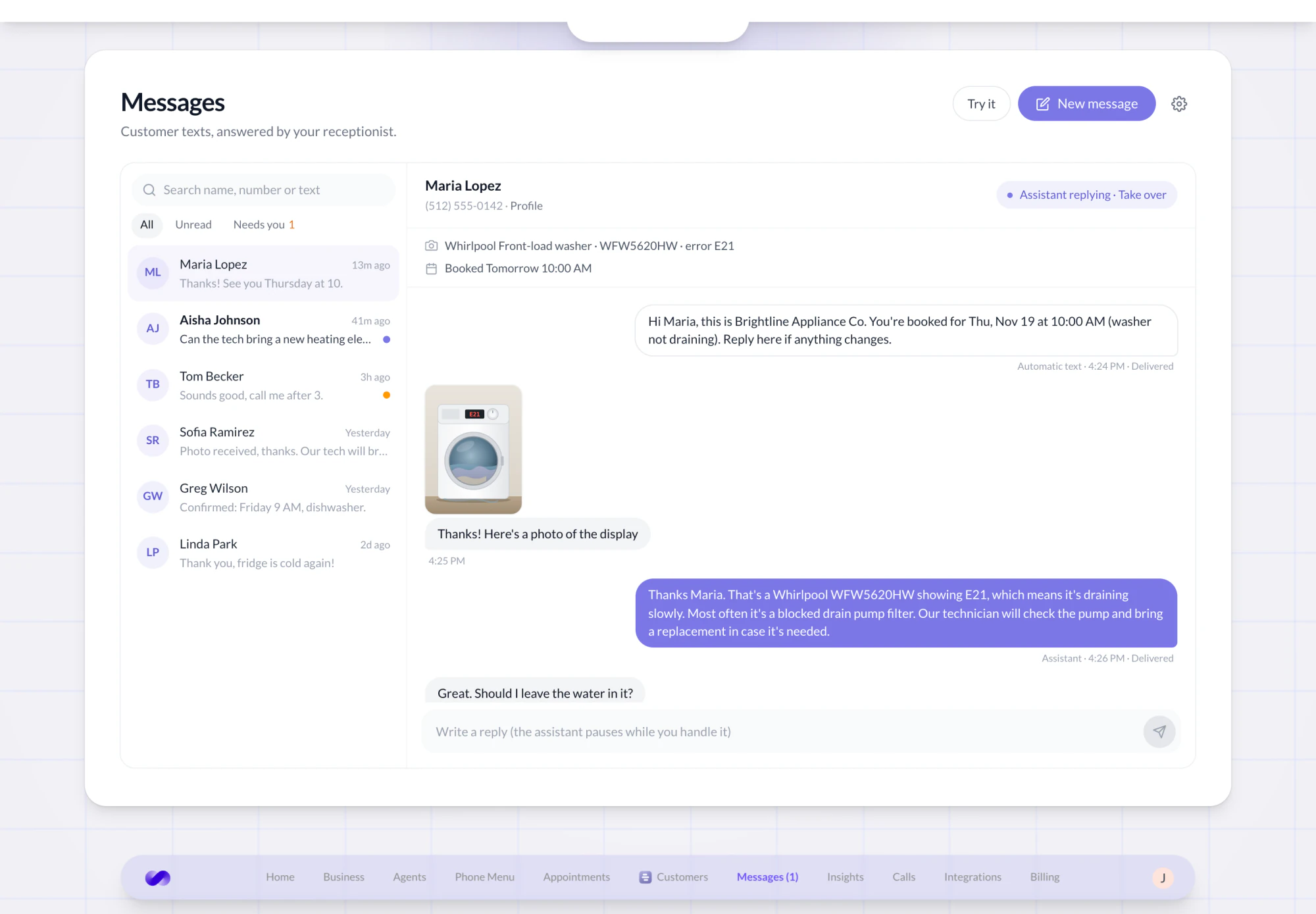
The dashboard, with our fictional demo shop's data.
What happens on the call
- Same number, same receptionist
Texts to your receptionist's number arrive in the Messages inbox. Replies use the same instructions, hours and prices as calls.
- Photos
A picture of the model sticker, the serial plate or an error code is read on arrival: brand, model, the likely fault and the parts to check are attached to the thread and the booking.
- Missed-call text-back
When a call isn't answered, the caller gets a text within seconds offering to book or help; quiet hours are respected.
- You can step in
Every thread is in the dashboard. Take over and it pauses; hand back and it picks up again. Threads that need you are flagged and you're alerted by text and email.
Settings in the dashboard
Plain switches and plain-language instructions.
Replies on or off, booking by text on or off, photo reading on or off, per receptionist.
Your own wording for the missed-call text, and the hours it's allowed to go out.
Where the needs-you alerts go: email, text, or both.
STOP and START are handled automatically and recorded on the thread.
Questions owners ask
Or ask Alex yourself: call +1 (534) 248-9962.
What counts as a conversation?
A thread with one customer in one month, however many messages it holds. Ten a month are included; the AI Texting add-on adds 100 more, then 35¢ a conversation.
Can my dispatcher reply?
Yes. Dispatchers have Messages access, can take over a thread and hand it back.
Does it text people who didn't text first?
Only the missed-call text-back and booking confirmations and reminders, which you can turn off. It never sends marketing.
What about MMS from iPhones and Android?
Both send photos to the number like any text. They're read on arrival.
Is this included in the plan?
Yes: AI texting is included, with 10 conversations a month. For more, the AI Texting add-on is $39 a month for 100 conversations, then 35¢ each. The phone side is unchanged.
Want us to set it up for you?
Leave a number. Someone from our team calls you, goes through your services, hours and service area, and sets your receptionist up with you.
- A person on our team calls you back
- Your greeting, questions and urgent-call rules, set up together
- You hear it answer before it takes real calls
Related pages
Hear how your next call gets answered.
Call the demo line and talk to Alex yourself. Live on your number in about ten minutes.
Demo line +1 (534) 248-9962